Features
Professional-grade tools for digital artists, photographers, and designers. Built natively for Linux for maximum performance.
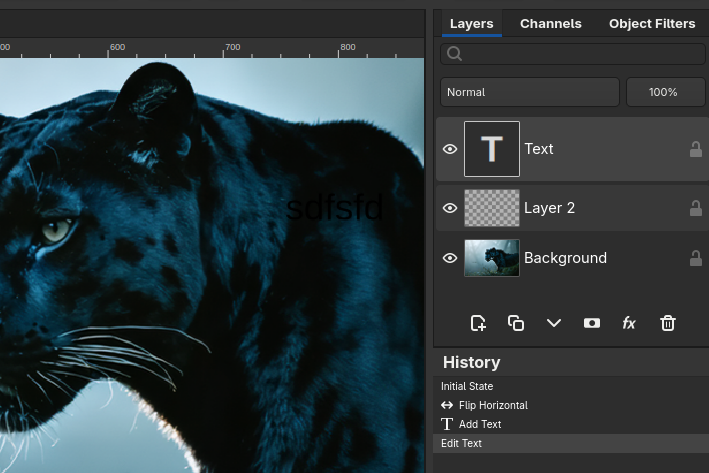
Layer-Based Editing
Work non-destructively with a full layer system. Organize your work into logical layers, apply blend modes, control opacity, and use layer masks for precise compositing.
Embedded Objects
Scale, rotate, and warp without ever touching the original pixels. Embed full-resolution originals or link external files that auto-update when changed. Place the same Embedded Object multiple times -- edit once, every instance updates.
.fog — Full Fidelity, Zero Compromise
The .fog native file format captures your entire project state
with perfect round-trip fidelity. Close your project today, open it next year --
every layer, mask, Embedded Object, blend mode, and adjustment is exactly where
you left it. No flattened layers, no lost data, no surprises.
Professional Toolset
Everything you need for serious creative work.
Non-Destructive Adjustments
Apply adjustment layers that modify appearance without altering pixel data. Stack object filters, tweak levels and curves, and fine-tune color grading -- all reversible at any time.
Selection & Retouching
Make precise selections and retouch with professional tools. Isolate subjects with geometric or freehand selections, heal blemishes, and separate skin texture from tone with frequency separation.
Text & Embedded Fonts
Add styled text to your compositions with full font support. Embed fonts directly into your project so designs look right on any machine -- no missing-font surprises when you share files.
Filters & Effects
Reach for 30+ image-processing filters with real-time preview. Blur, sharpen, distort, add noise, and stylize. All filters work with selections and can be applied to individual layers for precise, non-destructive compositing.
Color & Prepress
Prepare print-ready artwork with true CMYK editing and per-plate channel views. Add spot-color and multichannel separations, assign ICC profiles, soft-proof on screen, and watch total ink coverage so colors reproduce accurately on press.
File Format Support
Import files from any workflow. Fog Panther reads and writes all major image formats, including layered PSD files with layers, masks, and text preserved.
Layered
Lossless
Photos
Modern web
OpenRaster
Next-gen
Camera
Documents
Vector
Radiance
OpenEXR
Web
And Much More
Every tool you need, nothing you don't.
Persistent Undo History
Full undo history saved with your project. Close and reopen -- every step is still there to revisit.
Layer Groups & Organization
Group related layers into collapsible folders. Keep complex projects tidy and navigable.
Smooth Zoom & Pan
Navigate your canvas fluidly with smooth zoom, pan, and fit-to-window controls.
Crop & Transform
Crop, resize, rotate, and flip your images and individual layers with precision.
Color Picker & Fill
Pick colors from anywhere on canvas. Bucket fill with configurable threshold.
Large Image Performance
Handles massive images smoothly — even multi-gigapixel files stay responsive.
Actions & Batch Processing
Record a sequence of edits once, then replay it across a whole folder of images. Automate the repetitive work.
Command Palette
Press Ctrl+K to jump straight to any tool, filter, or command — no hunting through menus.
High Dynamic Range
Open and save 32-bit OpenEXR and Radiance HDR files, and edit in 16- and 32-bit float for the widest tonal range.
Warp Tool
Push, pull, and reshape pixels with a flexible mesh warp for precise local distortion.
Right-to-Left & Arabic Text
Full RTL and Arabic-script support with correct shaping and visual cursor navigation.